How to Delete Duplicate Photos on iPhone (2026)
Three ways to delete duplicate photos on iPhone, the built-in tool, a cleaner app, and the manual method. Step by step.
Updated
iPhones are very good at taking five identical pictures of the same thing. You hit the shutter, it takes a burst, you forget, and three months later your "Favorites" album is 40% blurry coffee cups.
Here's how to delete duplicate photos on iPhone, from the built-in tool (free, reliable, slow on huge libraries) to a cleaner app (fast, catches near-duplicates the Photos app misses).
Method 1: the built-in Duplicates albumLink to section
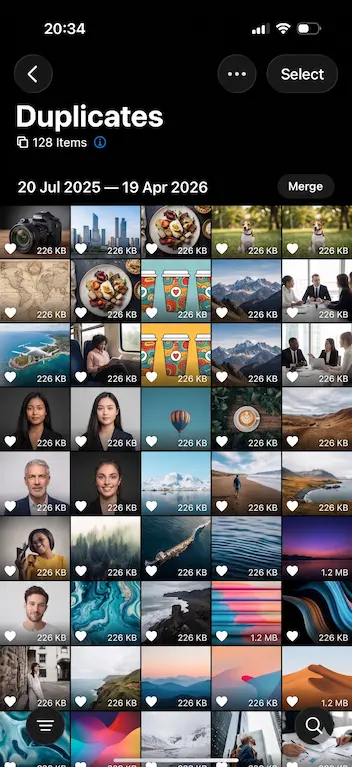
If you're on iOS 16 or later, Apple already built you a duplicate detector. It's just buried.
Open Photos > Albums
Tap the Photos app icon, then tap the Albums tab at the bottom of the screen.
Find the Duplicates album
Scroll all the way down to the Utilities section. Tap Duplicates. If you don't see it, either your library is still being scanned or you're on an older iOS.
Merge a pair or Select All
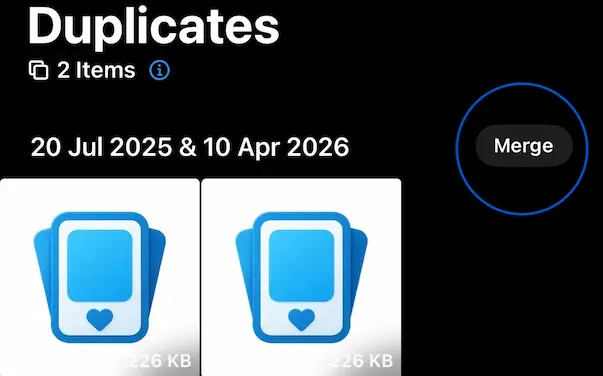
Each duplicate pair has a Merge button. Tap it to keep the highest-quality version and send the rest to Recently Deleted. To do them all at once, tap Select in the top-right, then Select All, then Merge.
Empty Recently Deleted
Merged photos linger in Recently Deleted for 30 days before they free up storage. To get your gigabytes back today, go to Albums > Recently Deleted, tap Select > Delete All, and confirm.
Method 2: swipe through them with a photo cleaner appLink to section
The built-in tool only finds exact duplicates, same image, same resolution. It won't catch the ten near-identical shots from a burst, or the photo you re-imported twice after a backup. And it's not fun.
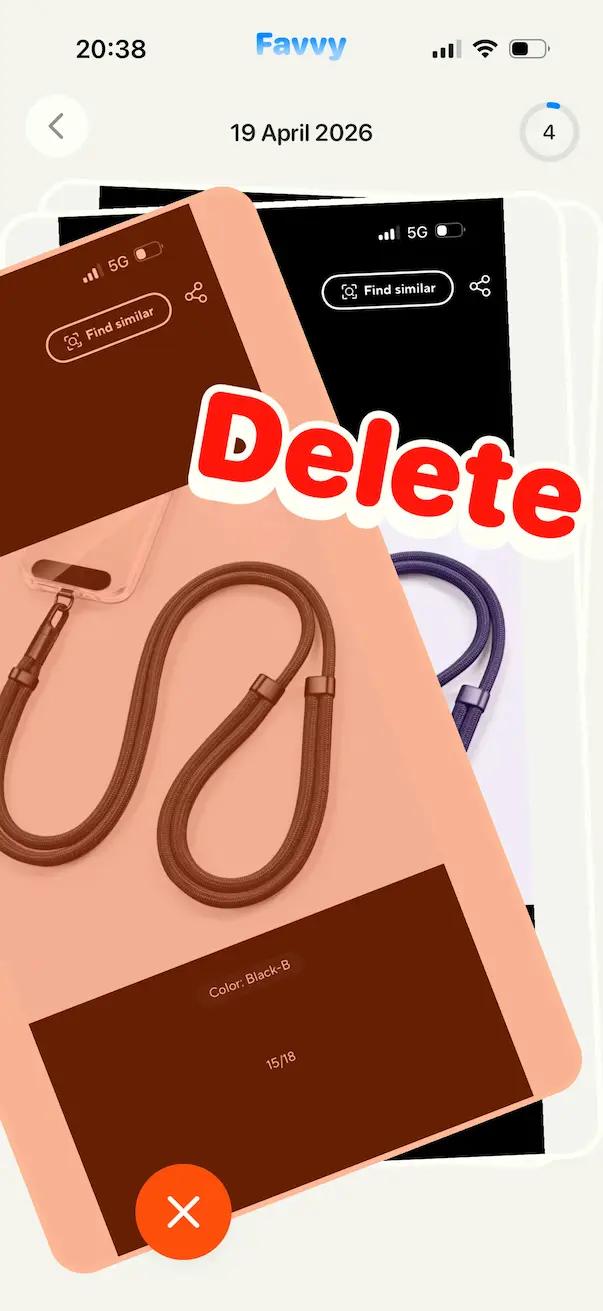
A swipe-to-clean app like Favvy lets you fly through whole stretches of your library. Start in Random or pick a specific month: your bursts and near-duplicates sit side by side, so deleting the extras takes one swipe.
Install Favvy
Grab it on iOS or on Android. Free to try, no account, nothing uploaded.
Pick a mode: Random or by Month
Random is fastest for catching duplicates scattered across years. By-month is best when you remember a specific weekend full of burst shots.
Swipe through the pile
Swipe left to delete, right to keep. Nothing is actually removed yet, you're just marking.
Review and confirm
At the end of the session, Favvy shows you everything you marked and asks for confirmation. Tap Confirm and the photos go to Recently Deleted.
Empty Recently Deleted
Same last step as before: Photos > Albums > Recently Deleted > Delete All.
Method 3: the manual way (if you only have a few)Link to section
If your duplicate problem is 20 photos and not 2,000, you don't need an app. Open Photos, tap Select in the top-right, tap every copy you don't want, then tap the trash icon. Don't forget to empty Recently Deleted.
Which method should you use?Link to section
| Feature | iPhone Duplicates album | Favvy |
|---|---|---|
| Built-in to iPhone | ✅ | ✗ |
| Finds exact duplicates | ✅ | ✅ |
| Works with bursts and near-duplicates | ✗ | Yes, via Random/month modes |
| Sort by month / Screenshots / Videos | ✗ | ✅ |
| Works on small libraries | ✅ | ✅ |
| Stays fun at 10,000+ photos | ✗ | ✅ |
For most people the answer is both. Use the built-in Duplicates album for the first pass (it's free and already on your phone), then install a photo cleaner app to catch the near-duplicates and the rest of the camera-roll clutter, screenshots, Live Photos, blurry shots.
Why do iPhones create so many duplicates?Link to section

A few innocent reasons:
- Shared albums: someone sends you the photo you already have via AirDrop or Messages, and iOS stores a second copy.
- Editing: when you edit a photo and save a copy instead of overwriting.
- Photo Stream / iCloud migrations: older photos sometimes get re-imported after a restore or Apple ID switch.
- Third-party apps: Instagram, WhatsApp, Telegram, TikTok all save copies to your camera roll by default (you can turn this off in each app's settings).
Turning off "Save to Camera Roll" in WhatsApp and Instagram alone will prevent hundreds of duplicates over the next year.
Get the app
Find every duplicate in one swipe session.
Favvy groups near-duplicates the iPhone Photos app misses. Free to try. Nothing uploaded.


Frequently asked questions
Does iPhone delete duplicates automatically?
Will I lose the original photo when I merge duplicates?
Why doesn't my iPhone show a Duplicates album?
What's the fastest way to delete duplicates on iPhone?
Get the app
Clean your gallery with Favvy
Swipe to keep or delete. Runs on-device, no account, no uploads. Free to try.